Gaming

Sunday, September 30. 2012

Minecraft and Gnome Shell

If you are running Minecraft on Linux with Gnome 3 then you might have noticed that it doesn't integrate well into Gnome Shell as you can see in these screenshots:
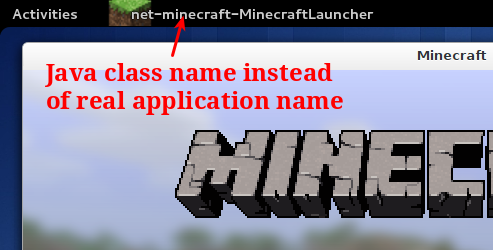
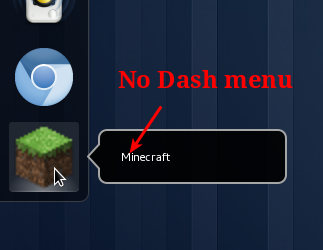
Java class name instead of real application name No Dash menu

So instead of having a nice application name like Minecraft Gnome Shell displays the Java class name. This is not really a problem of Minecraft but more a problem of bad Linux integration of Java applications in general. In Gnome 2 and other desktop environments this application name wasn't really important but since Gnome 3 it is crucial to have a valid application name because the Dash (The dock of Gnome Shell) uses it to connect the running application with its application launcher. And that's another problem: Minecraft doesn't create an application launcher. It only provides a JAR file you have to run somehow. And because this launcher doesn't exist and it can't be connected to the running application because of the bad application name you don't get the usual menu in the Dash to add Minecraft to your favorites.

All this can't be tolerated and must be fixed. In this article I will explain how.

Continue reading "Minecraft and Gnome Shell"

Tuesday, August 14. 2012

Minecraft on Linux

Installing Minecraft (version 1.3.1) on Linux is not always as simple as you might think. It's a Java application so it should run on all platforms supported by Oracle but unfortunately sometimes (For some unknown reasons) this doesn't work out of the box. This article describes how to get it running on a current Ubuntu Linux 12.04 on a 64 bit machine and how to create a desktop entry for it so you don't have to start it with this long command mentioned on the Minecraft website.

Continue reading "Minecraft on Linux"

Saturday, May 23. 2009

Guild Wars on Linux

Because I'm currently playing Guild Wars pretty often and I was too lazy to switch between Windows and Linux when I switched between playing and working I installed lots of development software on Windows so I can work there, too. But after Windows crashed and shredded some of my source files while doing this I decided to ditch Windows completely. So I installed Guild Wars on Linux (using Wine) and after some configuration changes it works well enough. It never runs as fast as on Windows but it is fully playable.

Continue reading "Guild Wars on Linux"

Monday, December 17. 2007

Disable intro in Oblivion

Sometimes I'm playing Elder Scrolls IV Oblivion on Linux with cedega. Unfortunately the game has many intro videos which can't be skipped for some reason under Linux. But I found a way to get rid of them. Just delete the following files from your Oblivion/Data/Video folder:

  • 2k games.bik
  • Oblivion Legal.bik
  • Oblivion iv logo.bik
  • bethesda softworks HD720p.bik
  • game studios.bik

When you now start the game then it skips all the intro videos and starts directly with the main menu.

Sunday, August 28. 2005